Release & Demo
Destroy The Moon System Requirements: Minimum, Recommended
Destroy The Moon needs Windows 10, 4 GB RAM, DirectX 11 and 2 GB of storage. The CPU and sound card lines on Steam are jokes; here is the real list.
Checked v1.5.0
Built from dated Steam patch posts and store pages; no hands-on playthrough, so no rankings or builds. See how facts are labelled.
Minimum and recommended lines on the Steam page
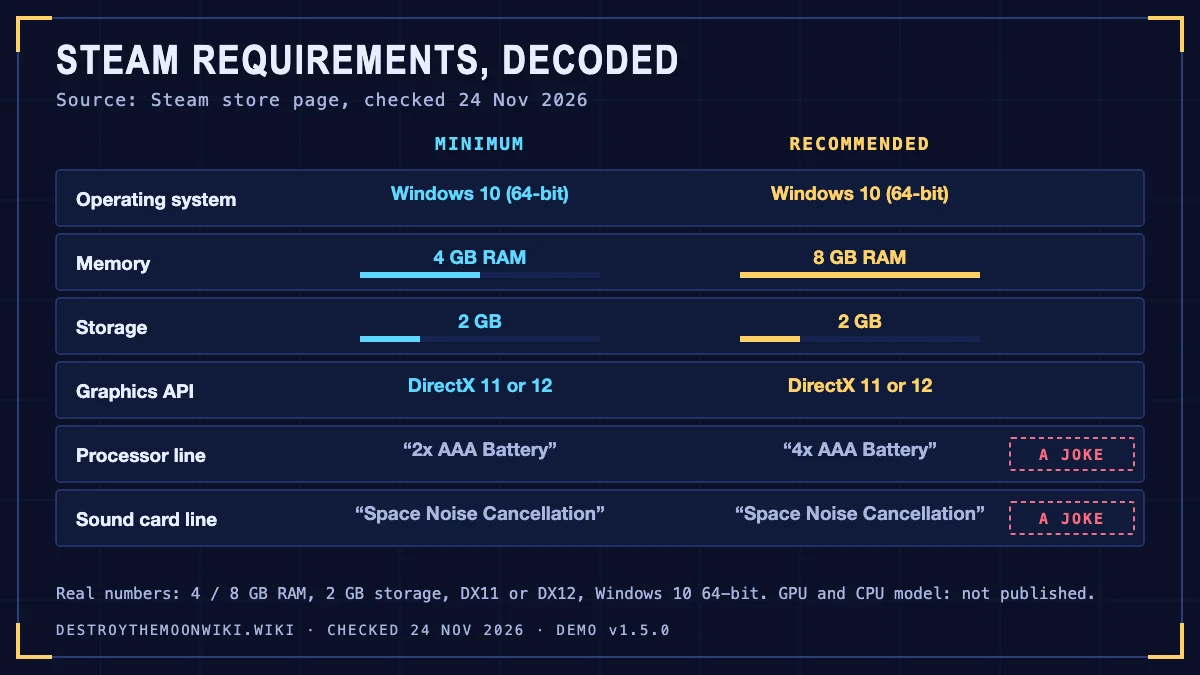
The Steam store page for Destroy The Moon and the free demo share the same specification block in the data we checked on 24 November 2026. The numbers that matter for hardware planning are operating system, RAM, DirectX version, and storage. Two lines on the page are deliberate jokes and should not be fed into a shopping list.
| Spec | Minimum | Recommended | Notes | Source |
|---|---|---|---|---|
| OS | Windows 10 (64-bit) | Windows 10 (64-bit) | No newer OS named | Store |
| Processor | "2x AAA Battery" | "4x AAA Battery" | Joke, not a CPU model | Store |
| Memory | 4 GB RAM | 8 GB RAM | Only numeric CPU-adjacent requirement | Store |
| Graphics | DirectX 11 or 12 | DirectX 11 or 12 | No GPU model listed | Store |
| Storage | 2 GB | 2 GB | Same both tiers | Store |
| Sound | "Space Noise Cancellation" | Same | Joke, not hardware | Store |
Not confirmed: discrete GPU tier, integrated graphics baseline, specific Intel or AMD CPU, monitor resolution, or refresh rate beyond incidental patch fixes for resolution dropdowns in the June 2026 posts.
Reading the joke lines without guessing
Lexilian Jack of all Trades styled the processor entries as battery counts and the sound card as "Space Noise Cancellation." Those strings match the game's sci-fi tone but carry zero technical meaning. A PC spec calculator that treats them literally will produce nonsense.
Everything performance-related in public posts should be read against the serious rows above:
- v1.5.0 (23 November 2026) claims four major Performance Optimization Passes across gameplay, weapons, enemies, VFX, and rendering, plus texture work aimed at late-game load.
- The same post adds a V-Sync toggle under Graphics Settings.
Neither item updates the store's RAM or disk figures, and neither states target frame rates or resolution presets. We do not infer "4 GB is enough for 1440p" from that silence.
Platforms the store excludes
The app details mark macOS and Linux false. Console ports are not confirmed. If you need a native ARM or Apple Silicon build, treat that as unsupported until the store flips those flags.
Steam Deck compatibility is not confirmed: no Deck rating category appeared in the data we checked, and posts do not mention handheld testing. v1.5.0 added controller support with rebinding and sensitivity, which is relevant to handheld play in principle, but not proof of Deck verification.
The full game target is Q1 2027 on the same Windows SKU; see release date for what is still unknown about launch day and price.
How patches interact with performance (facts only)
Several demo updates mention performance without revising the store spec table:
| Date / version | Performance-related note | Source |
|---|---|---|
| 2026-06-08 | XP dormancy and recycling for large XP counts | Patch 2026-06-08 |
| v1.5.0 | Four optimization passes; texture optimization | Patch v1.5.0 |
| v1.5.0 | V-Sync option added | Patch v1.5.0 |
Posts from v1.4.6 onward add dense late-game systems (Talents, Missions, more Shrine pressure, dialogue audio). That can increase CPU and GPU load even when minimum RAM on paper stays 4 GB. The developer did not publish an updated recommended tier after those features.
What to install for the demo today
- Windows 10 64-bit or later (only Windows is listed).
- DirectX 11 or 12 capable GPU (model not specified).
- 4 GB RAM minimum; 8 GB aligns with the recommended row.
- 2 GB free disk for the Steam depot (demo and main listing share the same requirement string).
Install Destroy The Moon Demo (4767530) to validate hardware before the full release. Let Steam patch to v1.5.0 or newer so you get V-Sync and the latest optimization pass. Gameplay settings beyond graphics V-Sync are documented indirectly through v1.5.0 notes.
GPU, CPU and disk details the requirements omit
- GPU: No minimum VRAM, no brand, no feature level beyond DX11/12.
- CPU and disk: Real CPU model requirements are not confirmed because only joke strings are published, and SSD versus HDD is not stated either.
- Display: Posts mention ultrawide and aspect-ratio layout work in v1.4.0 Game Over UI, not a required resolution.
If benchmarking reveals stutter after v1.5.0 on a machine that meets the RAM and API rows, note your resolution, V-Sync on or off, and difficulty; send details to contact@destroythemoonwiki.wiki so this page can stay aligned with player reports without pretending we ran labs here.
Related pages
For input devices after v1.5.0, read controller support. For the changelog behind the optimization passes, use v1.5.0 or the full patch ledger. The demo install path and App IDs sit on the demo page.
Frequently asked questions
What are the real Destroy The Moon system requirements?
Windows 10 (64-bit), 4 GB RAM minimum (8 GB recommended), DirectX 11 or 12, and 2 GB of storage, per the Steam store page. No serious GPU or CPU model is listed.
Why does Steam list AAA batteries as the processor?
The developer used joke strings for CPU and sound card. The v1.5.0 post does not replace them with real part numbers.
Did v1.5.0 change the printed specs?
No change in the store requirements text we checked. v1.5.0 added four optimization passes and a V-Sync option instead.
Is there a Mac or Linux build?
Not confirmed for purchase or demo. Steam flags mac and linux false for both App IDs in the data we pulled.
Keep reading
 Destroy The Moon Controller Support: Full Support in v1.5.0
Full controller support arrived in demo v1.5.0 on 23 November 2026, with rebindable buttons and sensitivity settings.
2026-11-24
 Destroy The Moon Demo: Free Download, Content and Updates
The free Steam demo (App ID 4767530) is a separate entry that has received fifteen patch posts through v1.5.0.
2026-11-24
 Destroy The Moon Release Date, Price and Platforms
Steam lists Destroy The Moon for Q1 2027 with no price and no reviews yet; the free demo is already at v1.5.0.
2026-11-24
 Destroy The Moon Alien Ships: Abilities and Frenzy Bomb
Alien Ships and their abilities as documented in patch notes from June 2026 to v1.5.0, from flamethrowers to Frenzy Bombs.
2026-11-24