Game Systems
How to Play Destroy The Moon: Controls, HUD and Core Loop
How a Destroy The Moon run works from the official notes: auto fire, boost, reverse on S, the HUD toggles, level-up cards, shrines and what ends a run.
Checked v1.5.0
Built from dated Steam patch posts and store pages; no hands-on playthrough, so no rankings or builds. See how facts are labelled.
What playing Destroy The Moon means in the published materials
The Steam store tags list Action Roguelike, Roguelite, and Bullet Heaven among others. The one-line pitch on the main listing says you turn ARTEMIS-X into a living superweapon and hold off alien hordes, Alien Spaceships, and the Space Worm to protect the Moon. The demo store blurb narrows Space Events to Meteors and Shrines, with six base weapons and more than ten evolutions.
Core loop: survival, XP, and level-up cards
Progression rests on experience and cards. The 8 June 2026 post made XP orbs persistent so they no longer vanish after a short time, and retuned the XP curve for that behavior. When you level up you choose cards; v1.3.0 added hover descriptions on each card. v1.4.3 added Survival Card Catch-Up to reduce extreme bad-luck streaks while keeping normal level-up randomness. v1.4.7 moved Rerolls and Card Reserve into the Mastery talent tree.
v1.4.3 also changed flow during pickups: level-ups no longer cancel a charged Teleport or Super Sprint. Charge freezes while the level-up panel is open and resumes from the stored amount when you continue holding the input.
Weapons target enemies without manual firing unless you disable auto mode. The same June post introduced Auto Fire defaulting to on. You still steer, boost, and use defensive tools while guns cycle.
Space Events in the demo are Meteors and Shrines (Store demo page). Meteors feed Cosmic Energy and stat bonuses in later patches. Shrines cycle through Lightning, Fire, Darkness, and Chaos with different risks and rewards. Details sit on the Shrines page. Spending Cosmic Energy at Space Anomalies activates an XP Vacuum; see Cosmic Energy.
Controls and movement options
Movement layers stacked across 2026. Boost appears on official HUD shots as Boost: Normal (Shift). Super Sprint existed before v1.4.0 as a charged ability. v1.4.0 sold Teleportation from the new Skills Shop with Lunar Shards; it replaces Super Sprint after purchase, works while stationary, and moves the ship along its facing direction.
| Input / feature | Default or note | First post |
|---|---|---|
| Auto Fire | On (toggle off in settings) | 8 Jun 2026 |
| Boost | Shift (Shot HUD) |
Shot |
| Reverse | S or Down Arrow | v1.4.1 |
| Key bindings | Primary + Secondary per action | v1.4.1 |
| Teleportation | Replaces Super Sprint after Skills Shop buy | v1.4.0 |
| Controller | Full support, rebind, sensitivity | v1.5.0 |
v1.5.0 rebalanced Super Sprint and Teleportation boost consumption and travel distance. Gamepad details are on controller support. v1.4.7 shipped a first-run tutorial for controls, HUD, resources, missions, health, and boost.
HUD elements readers see in screenshots
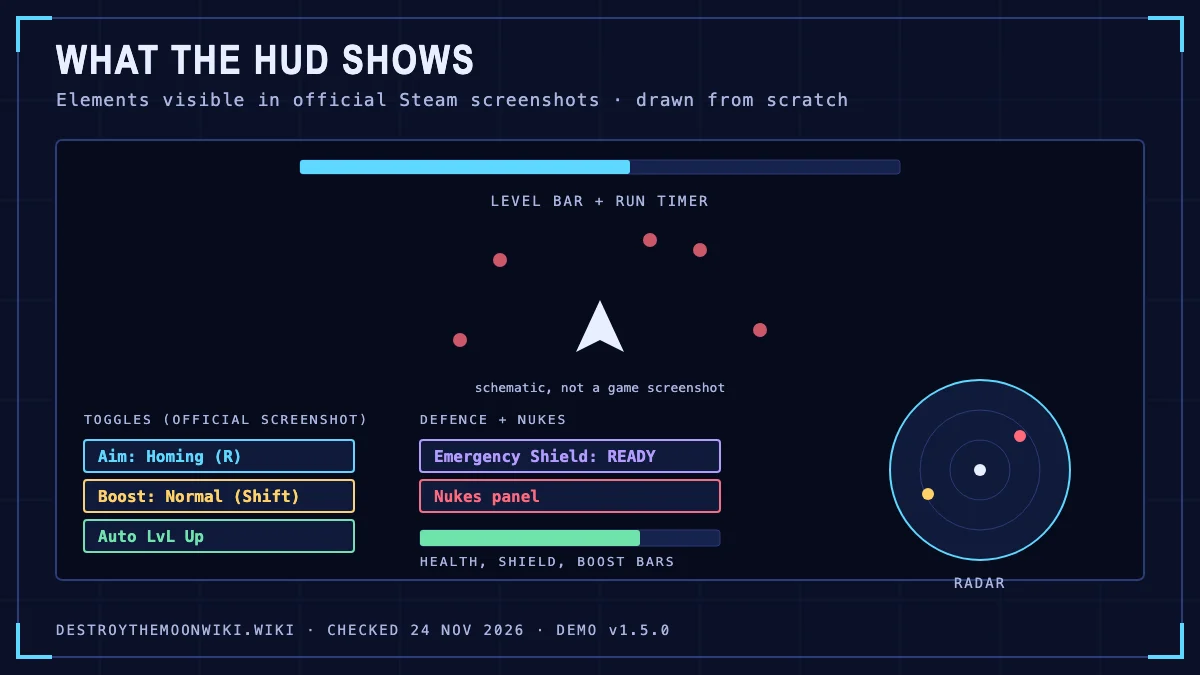
Official Steam screenshots show several persistent readouts. Aim mode appears as Aim: Homing (R). Three toggle-style labels group aim, boost, and Auto LvL Up. Emergency Shield shows a cooldown such as 17.2s or READY. A radar sits in the corner; v1.4.0 expanded statistics tracking meteors, shrines, checkpoints, distance, DPS, and weapon damage on the Game Over side.
v1.5.0 added a Spaceship Panel with ship stats, current weapon build, mission objectives, and radar information. v1.3.0 split audio into Music and Ambience sliders and added end-of-run timer warnings with red pulses until death.
Defensive layers named in posts and HUD shots include Emergency Shield, Immune Shield, Nukes (with a panel in screenshots), and one-use Immunity from Anomaly Core rewards (v1.4.1). Exact cooldown math beyond Emergency Shield display is not fully listed in posts.
What ends a run and what scores
Failure is HP reaching zero. v1.4.3 made the Game Over screen navigable by keyboard: W or Up toward Play Again, S or Down toward Main Menu, Enter to confirm, and 1/2/3 to switch Damage, Summary, and Other tabs. The 4 June demo post already referenced objectives scoring and clearer breakdown lines on Game Over.
Success got a new route in v1.5.0: the Victory Portal Escape Sequence is described as a new ending for successful runs, with a reworked Play Again flow. The notes do not spell out every win condition that triggers the portal; mission objectives from v1.4.7 may factor in. Read missions and difficulty levels for Extreme unlock rules separate from a standard clear.
Picking difficulty and long-term upgrades
Before or between runs you choose Easy, Medium, Hard, or Extreme after unlock. Player HP values and the 2.50x Extreme multiplier are documented on difficulty levels. v1.4.6 added permanent talent trees bought with Lunar Shards; v1.4.0 opened the Skills Shop for Teleportation. Talents and Lunar Shards cover meta progression without inventing prices the notes omit.
Inquisitor encounters and reworked meteor loot arrived in v1.5.0. For the same-day feature list, see v1.5.0 patch notes and the master patch ledger.
Victory Portal, Auto Level Up and pad layout: open after v1.5.0
- Victory Portal trigger. The exact condition for the ending, and whether every mission type uses the same one, is not documented.
- Auto Level Up and shrines. How Auto Level Up interacts with every shrine reward is unclear (v1.5.0 fixed Darkness Shrine 1.1x XP with Auto Level Up).
- Default controller layout. The v1.5.0 notes add full pad support but never list the default buttons.
Email contact@destroythemoonwiki.wiki if you document any of these with a build number. For enemy pressure during long runs, cross-check Alien Ships spawn scaling at 7:30 and 15:00 on Medium and Hard.
Frequently asked questions
Do weapons shoot automatically in Destroy The Moon?
Yes by default. The 8 June 2026 post added an Auto Fire toggle so all weapons shoot automatically unless you turn it off. The 11 June post added a grace period when toggling it.
What keys move the ship?
Official screenshots label Boost as Normal on Shift. v1.4.1 added Reverse on S or Down Arrow with Primary and Secondary binding slots. v1.4.0 added Teleportation from the Skills Shop, replacing Super Sprint after purchase.
How does a run end?
Death at zero HP opens Game Over with Damage, Summary, and Other tabs (keyboard nav in v1.4.3). v1.5.0 added a Victory Portal Escape Sequence as a new ending for successful runs.
Is there a tutorial?
v1.4.7 added a first-run tutorial covering controls, HUD, resources, missions, health, and boost. The tutorial is marked completed permanently after you finish it.
Keep reading
 Destroy The Moon Controller Support: Full Support in v1.5.0
Full controller support arrived in demo v1.5.0 on 23 November 2026, with rebindable buttons and sensitivity settings.
2026-11-24
 Destroy The Moon Cosmic Energy, Anomalies and Meteor Drops
Cosmic Energy replaced Meteor Fragments in v1.4.7; v1.5.0 added drops from Meteors, Shrines and Alien Ships.
2026-11-24
 Destroy The Moon Difficulty: Easy to Extreme, Player HP
Easy, Medium and Hard, plus Extreme at 2.50x after a Hard milestone, with the player HP changes across three patches.
2026-11-24
 Destroy The Moon Shrines: Lightning, Fire, Darkness, Chaos
The four Shrines added in v1.4.0 (Lightning, Fire, Darkness, Chaos), what each does and the numbers changed since.
2026-11-24